
The best smart plug with energy monitoring is the one you will use on the right appliances. For most Australian homes, start with one or two reliable plugs for lamps, heaters, dehumidifiers or office gear, then expand after you know which devices are worth automating.
Smart plugs are one of the cheapest ways to make a home feel smarter. They also belong in the Energy Tech cluster because they can show standby power, schedule appliances and help you test whether a device is actually costing much to run.
What should a smart plug do?
A smart plug should solve a simple problem: turn something on or off remotely, schedule a routine, or measure power use. If it cannot do at least one of those clearly, it is probably just adding another app to your phone.
- Remote switching: Useful for lamps, fans, chargers and simple appliances.
- Scheduling: Good for lights, office gear, heated throws and seasonal devices.
- Energy monitoring: Shows watts and usage over time, which helps you find expensive habits.
- Platform support: Matter, Alexa, Google Home, Apple Home and Home Assistant support matter more as your setup grows.
- Safety rating: Check the plug’s load rating before using heaters, kettles, washing machines or power boards.
Quick comparison: smart plug options
| Product | Best for | Energy monitoring | Smart-home fit | Buying note |
|---|---|---|---|---|
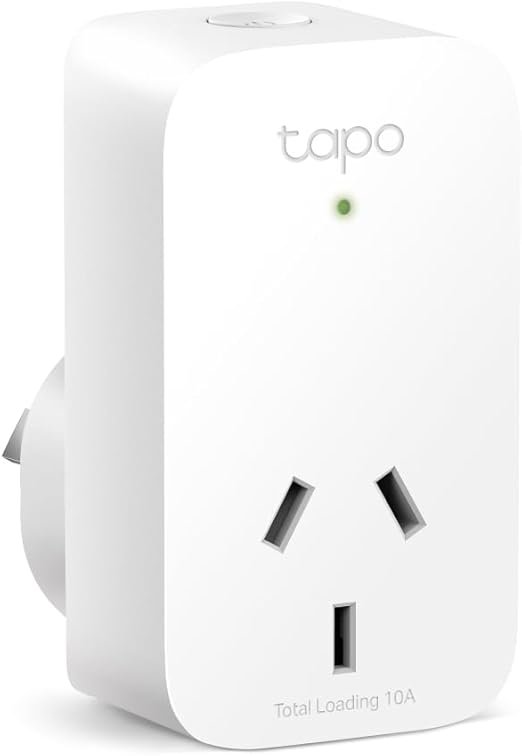
| TP-Link Tapo P100 Mini Smart Wi-Fi Socket | Cheap schedules and remote control | No | Alexa, Google, Tapo app, Home Assistant integrations | Existing PrettyLink |
| TP-Link Tapo P110M | Energy tracking with Matter support | Yes | Matter-friendly homes | Check price |
| Meross Mini Smart Plug pack | Multi-room basics | Depends on model | Good for Alexa/Google households | Compare exact pack and energy-monitoring support |
| Smart power strip | Home office and entertainment setups | Sometimes per outlet, sometimes total only | Useful when several devices sit together | Useful when several devices sit together |
Best cheap first plug: TP-Link Tapo P100
The TP-Link Tapo P100 is a solid entry-level product for simple control. It does not provide detailed power usage, but it is cheap and good for routines.
Use it where you need control rather than measurement: a desk lamp, fan, Christmas lights, charger station or appliance that should turn off every night. That is enough for many homes.
Best upgrade: Tapo P110M or another Matter energy plug
If you specifically want energy data, look for a model such as the TP-Link Tapo P110M or another Matter-compatible plug with power monitoring. The “M” matters because Matter support can reduce platform lock-in, especially if your house uses a mix of Apple Home, Google Home, Alexa and Home Assistant.
Energy monitoring is useful when you are deciding whether a device belongs on a timer. For example, you can measure a dehumidifier, old fridge, home-office setup or entertainment cabinet for a week, then make a better decision about automation.
Check the TP-Link Tapo P110M price on Amazon Australia.
When should you use a smart power strip?
A smart power strip makes sense when several devices live in one place: monitor, speakers, laptop dock, printer, TV, console and streaming box. The benefit is control at the outlet group level rather than buying four separate plugs.
The caution is energy data. Some strips monitor the whole strip, while others offer per-outlet reporting. If the goal is to identify which device wastes power, check the reporting detail before buying.
Safety notes for Australian homes
Do not treat a smart plug as a magic adapter. Check the rating of the plug and the appliance. High-load heating and cooking appliances need extra caution, and anything that creates heat should not be left running unattended just because an app can turn it off.
Smart plugs are excellent for measurement and simple switching. They are not a substitute for proper electrical work, a safe power board, or a licensed electrician when fixed wiring is involved.
Best smart plug uses
- Turn off a home-office setup after work.
- Measure a dehumidifier or air purifier for a week.
- Schedule a lamp for evening occupancy lighting.
- Control a fan from a voice assistant.
- Find standby load in an entertainment cabinet.
Bottom line
Start with the Tapo P100 if you only need cheap control. Buy an energy-monitoring plug such as the Tapo P110M if you want real usage data. Smart plugs are useful because they show what your appliances draw when nobody is paying attention.
Frequently Asked Questions
Can I use a smart plug on a heater or kettle?
Only if the plug’s rated load supports the appliance. High-heat devices need careful rating checks and should not run unattended.
Do smart plugs work with Home Assistant?
Many Tapo and Meross models do via integrations or Matter. Confirm local control support before buying.
Tapo P100 vs P110M?
P100 is for switching only. P110M adds energy monitoring and Matter support.
Are smart plugs safe for power boards?
Do not overload boards. One plug per high-value circuit is safer than daisy-chaining unknown loads.