

The best security cameras without subscription fees are usually local-storage cameras from brands such as Reolink, Eufy and Amcrest. For most Australian homes, the right choice depends on whether you want a simple battery camera, a wired PoE camera, or a full local NVR setup.
This guide complements our video doorbells without a subscription article. Doorbells cover the front entry; security cameras cover the rest of the property.
What does “without subscription” actually mean?
Without subscription should mean you can record, review and keep useful footage without paying a monthly cloud plan. It does not always mean every feature is free. Some brands keep advanced AI detection, longer cloud history or rich notifications behind paid plans.
Before buying, check where footage is stored, how long it stays there, and whether the app still works properly without a subscription. Local storage is the feature that protects you from monthly fee creep.
Quick comparison: no-subscription camera options
| Product type | Best for | Storage style | Trade-off | Buying note |
|---|---|---|---|---|
| REOLINK 4K Wi-Fi security camera | Simple local-first outdoor monitoring | microSD, NVR options depending on model | Needs careful model selection | Existing PrettyLink |
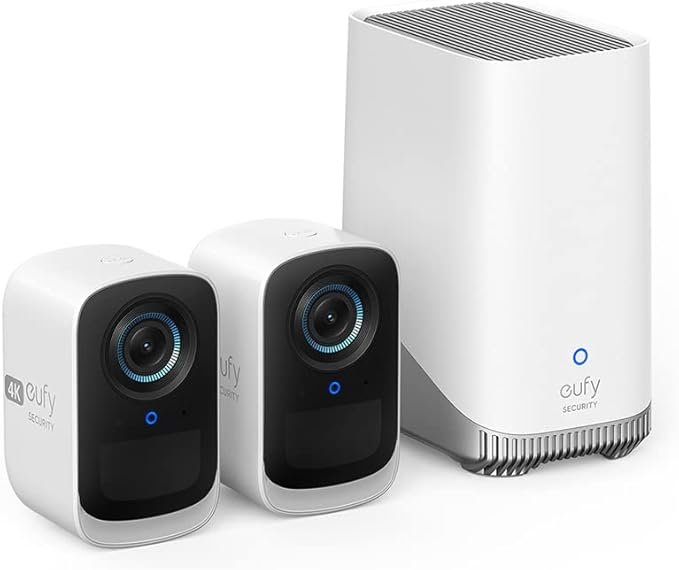
| Eufy security camera system | App-friendly local storage | HomeBase/local storage depending on bundle | Check privacy settings and exact bundle features | Check price |
| Amcrest PoE camera | Blue Iris, Frigate and DIY NVR users | NVR, NAS or software recorder | More setup work | Existing PrettyLink |
| Ring or Blink camera | Alexa-first households | Often cloud-plan oriented | Subscription may be needed for full value | Compare subscription cost before buying |
Best local-first pick: Reolink
Reolink is the first brand to check if you want useful security without a forced monthly plan. The REOLINK 4K Wi-Fi security camera fits local-storage setups and scales toward NVR or Frigate later.
Reolink is especially useful if you might later add an NVR, PoE cameras or software such as Frigate. It gives you a path from “one camera outside” to “proper home surveillance” without starting over.
Best simple app option: Eufy
Eufy is often the easier recommendation for someone who wants local storage but does not want to learn NVRs, PoE switches or camera streams. Bundles with a local hub can be a good middle ground between cloud-first cameras and full DIY surveillance.
The caution is to check the exact bundle. Eufy model names and storage features vary. Make sure the camera you buy supports the local storage setup you expect, not just “works with Eufy” in a vague way.
Check the Eufy security camera bundle price on Amazon Australia.
Best DIY NVR path: Amcrest plus Blue Iris or Frigate
If you want control, the Amcrest 5MP PoE outdoor vandal dome camera is the more technical path. It is a better match for people comparing Blue Iris vs Frigate or planning local object detection.
The benefit is ownership. You decide the recorder, storage drive, retention period and detection stack. The downside is setup time. This is not the easiest path for a rental or a quick weekend install.
Should you still consider Ring or Blink?
Ring and Blink can be good products, especially for Alexa households, but they are not the cleanest fit for a no-subscription article. They often work best when paired with a cloud plan. That does not make them bad, but it changes the cost equation.
If you are comparing EOFY deals, calculate the camera price plus two or three years of subscription fees. A cheaper camera can become the expensive option if the useful features sit behind a plan.
Buying checklist
- Confirm local storage before buying.
- Check whether person detection requires a subscription.
- For outdoor cameras, check weather rating and mounting requirements.
- For battery cameras, check realistic battery life with motion alerts enabled.
- For PoE cameras, budget for cabling, a PoE switch and recording storage.
Bottom line
For a no-subscription security camera setup in Australia, start with Reolink if you want a local-first system, Eufy if you want simple local storage, and Amcrest if you are building a serious DIY NVR. Compare camera price plus storage plus subscription fees over two or three years, not the headline discount alone.
Frequently Asked Questions
Can security cameras work without a monthly fee?
Yes, with local storage on microSD, NVR, or a hub. Confirm the model supports recording without a cloud plan.
Are wireless cameras good for outdoors?
They can be, but check IP rating, mounting and realistic battery life with motion alerts enabled.
Reolink or Eufy for beginners?
Eufy is usually simpler in the app. Reolink scales better toward multi-camera NVR setups.
Do I need PoE cameras?
PoE suits fixed installs and DIY NVRs. Battery cameras are easier for rentals or quick tests.