
15 Actionable Ways to Save Energy at Home in 2025
Is your electric bill creeping up every month? You’re not alone. The good news is that you have more control than you think. Learning how to reduce your electric bill is a combination of building smart habits and using even smarter technology. This guide will give you 15 actionable ways to save energy at home, starting today.
We’ll cover everything from free changes you can make right now to simple tech upgrades that will pay for themselves over time. Start here and start saving!
Part 1: Free & Easy Habit Changes
1. Adjust Your Thermostat
This is the biggest and easiest win. Lowering your thermostat by just a few degrees in the winter, and raising it a few degrees in the summer, can save up to 10% on your energy costs.
2. Use Cold Water for Laundry
Modern detergents are designed to work brilliantly in cold water. About 90% of the energy used by a washing machine goes to heating the water, so switching to cold is a massive energy saver.
3. Unplug Chargers and Devices
Your phone charger, laptop charger, and TV all draw power even when they’re turned off. This is known as “vampire power.” Get into the habit of unplugging them when not in use.
4. Air Dry Clothes and Dishes
Your clothes dryer is one of the most power-hungry appliances in your home. Use a drying rack whenever possible. Similarly, open your dishwasher at the end of the cycle to let your dishes air dry instead of using the heated dry function.
5. Use Lids on Pots and Pans
A simple one for the kitchen: covering your pots and pans while cooking traps heat, allowing you to use a lower temperature and cook your food faster, which helps you save electricity at home.
Part 2: Smart Tech Upgrades That Pay for Themselves
Also,where modern home technology becomes your secret weapon for energy savings. These devices provide convenience and a significant return on investment.
6. Slay “Vampire Power” with Smart Plugs
Remember that “vampire power” we talked about? A smart plug is the ultimate weapon against it. You can schedule your entertainment centre or home office setup to turn off completely during the night, ensuring zero wasted electricity.
Our Pick: TP-Link Tapo Mini Smart Plug
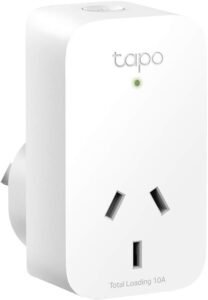
The Tapo Mini is a fantastic, affordable smart plug that allows you to control any device from your phone. Use its schedule and timer functions to effortlessly cut power to energy-draining devices when you’re not using them.
7. Install a Smart Thermostat
A smart thermostat goes beyond a simple schedule. It learns your habits, detects when you’re away from home, and optimizes your heating and cooling to save the maximum amount of energy without sacrificing comfort.
Our Pick: Google Nest Thermostat
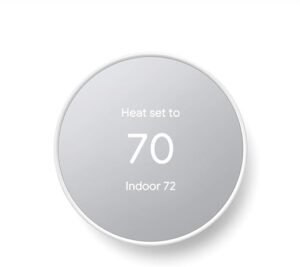
Thisogle Nest Thermostat is the industry leader for a reason. It’s incredibly easy to install and use, and its learning algorithm is proven to reduce energy bills. It can even suggest more efficient temperatures for you to save even more.
8. Switch to LED Smart Bulbs
If you’re still using old incandescent bulbs, you’re wasting a huge amount of energy. LED bulbs use up to 85% less electricity. Smart LED bulbs take it a step further, allowing you to dim them and schedule them to turn off automatically.
Our Pick: Philips Hue White Filament Smart Bulb
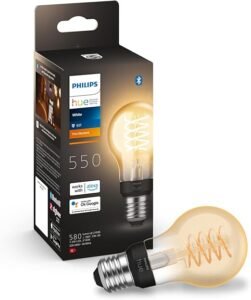
Get the best of both worlds: incredible energy efficiency and beautiful vintage style. These Philips Hue bulbs look amazing and give you full smart control. Dim them for a cozy evening and never worry about accidentally leaving a light on again.
9. Automate Your Curtains for Passive Cooling
In the summer, the sun beating through your windows can dramatically heat up your home, forcing your AC to work overtime. Automating your curtains is a high-tech solution to this age-old problem.
Our Pick: SwitchBot Curtain Opener
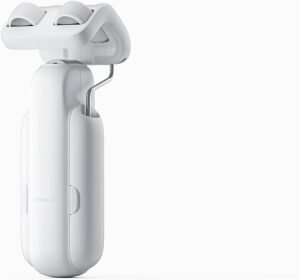
Also,ius device clips onto your existing curtain rod and automatically opens and closes them on a schedule. Program them to close during the hottest part of the day to block the sun, keeping your home cooler and saving a fortune on air conditioning.
10. Use a Smart Power Strip
For areas like your entertainment centre or office, a smart power strip is even better than a single plug. You can control each outlet individually, turning off your TV but leaving your internet router on.
11. Install Motion Sensor Light Switches
Perfect for hallways, laundry rooms, or bathrooms. A motion sensor ensures the lights are only on when someone is in the room and turn off automatically after they leave.
12. Get a Smart Water Heater Controller
Heating water is a huge energy cost. A smart controller allows you to schedule your water heater to turn off when you’re at work or on vacation, saving energy without you even noticing.
Part 3: The Big Picture Savings
13. Weatherstrip Doors and Windows
Small gaps and cracks around doors and windows can lead to massive energy loss. Applying simple foam or rubber weatherstripping is a cheap and incredibly effective way to keep the hot or cold air outside.
14. Clean Your Refrigerator Coils
Thisils on the back of your fridge get dusty, which makes the compressor work harder and use more energy. A quick vacuum once a year can improve its efficiency.
15. Choose Energy-Efficient Appliances
When it’s time to replace a major appliance like a refrigerator or washing machine, making the right choice can save you hundreds of dollars over its lifetime. This is one of the most impactful energy saving ideas for any home.
Next Steps: Choosing the Right Appliances
When you replace a major appliance, star ratings and smart features both matter. Compare running costs, not just purchase price.
Cross-check compatibility, safety and local rules with official sources before you buy. Australian 240 V wiring, RCM labelling and hub protocols change with firmware updates, so confirm details against manufacturer docs and a licensed electrician when mains power is involved.
Frequently Asked Questions
What is the easiest way to save energy at home?
Smart plugs and thermostats that cut standby load and heat/cool only when needed. LED lighting and sealing drafts are low-cost wins too.
Do smart plugs actually save money?
They help when devices draw standby power or when you schedule loads off-peak. They do not fix poor insulation or old inefficient appliances alone.
Are smart thermostats worth it in Australia?
commonly yes if you heat or cool daily and your schedule varies. Less benefit if you already turn systems off manually when leaving.
Where should I start with home energy tech?
Measure first: smart plug with energy monitoring or your retailer app. Then automate the biggest loads you identify.
Quick checklist
- Compare at least two local providers
- Confirm opening hours and payment methods
- Read recent reviews and ask about extras
Cross-check compatibility, safety and local rules with official sources before you buy. Australian 240 V wiring, RCM labelling and hub protocols change with firmware updates, so confirm details against manufacturer docs and a licensed electrician when mains power is involved.
How much does smart home gear cost over five years?
Sticker price is only part of the story. Hubs, repeaters, replacement batteries, cloud subscriptions and electrician call-outs can add up quickly on Australian 240 V installs. We compare total ownership cost in our reviews and link to primary references such as the Home Assistant documentation and the Matter specification when protocol compatibility matters. Budget for at least one spare sensor or switch when you standardise on a hub — mixed-vendor kits often need extra repeaters.
Cross-check compatibility, safety and local rules with official sources before you buy. Australian 240 V wiring, RCM labelling and hub protocols change with firmware updates, so confirm details against manufacturer docs and a licensed electrician when mains power is involved.
Which protocol should you standardise on?
Wi-Fi devices are easy to buy but noisy on your network. Zigbee and Thread/Matter devices usually need a compatible hub or border router, yet they tend to behave better when the internet drops. Before you bulk-buy sensors or switches, decide whether Modern Home Tech readers should prioritise local control, Apple Home, Google Home or Home Assistant — then pick products that match that path instead of mixing three ecosystems by accident. Thread border routers in Australia must still meet RCM requirements for radio equipment.
Which smart home news topics matter most for owners?
Protocol changes, security advisories and tariff updates affect real households more than launch-day hype. We prioritise Matter and Thread compatibility notes, recall notices, and energy price shifts that change whether automations still save money. Firmware regressions that break local control also rank above minor app redesigns — those are the updates worth reading before you buy more gear.
Cross-check compatibility, safety and local rules with official sources before you buy. Australian 240 V wiring, RCM labelling and hub protocols change with firmware updates, so confirm details against manufacturer docs and a licensed electrician when mains power is involved.


