
10 Stunning Home Assistant Dashboard Ideas for Inspiration (2025)
10 Home Assistant Dashboard Ideas to Inspire You
Home Assistant Dashboard Ideas One of the most powerful features of Home Assistant is its ability to create completely custom dashboards (originally known as Lovelace). A great dashboard is more than just a collection of buttons; it's the command centre for your entire home, a beautiful piece of functional art that provides all the information you need at a single
If you’re looking for home assistant dashboard ideas, you’ve come to the right place. We’ve gathered 10 stunning and functional examples to spark your creativity and show you what’s possible. If you’re a minimalist or a data fanatic, there’s a design here for you.
The Perfect Display: Your 24/7 Command centre
While you can access your dashboard from any phone or computer, the ultimate experience comes from a dedicated, wall-mounted tablet. A permanent home assistant tablet dashboard becomes a central, accessible hub for the entire family. Here are the components you need to create a clean, professional-looking setup.
1. The Display: Samsung Galaxy Tab A9+
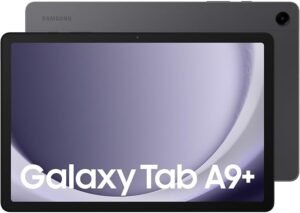
To do justice to a beautiful home assistant dashboard, you need a vibrant, responsive screen. The Samsung Galaxy Tab A9+ is a fantastic choice, offering a large, high-resolution display and excellent performance without the premium price tag of an iPad. It’s the perfect canvas for your smart home masterpiece.
2. The Mount: elago Home Hub Mount
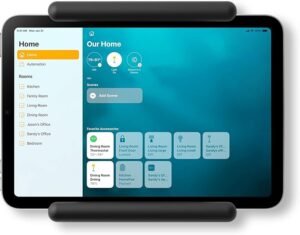
Don’t just lean your tablet against the wall. A dedicated mount creates a clean, integrated look that elevates your setup from a simple gadget to a true smart home feature. The elago Home Hub Mount is a sleek, minimalist option with built-in cable management, making for a simple and professional installation.
10 Inspiring Dashboard Examples
1. The Minimalist
Less is more. This design focuses on clean lines, lots of empty space, and only the most essential controls. It’s perfect for a clean, modern aesthetic and is commonly built using popular themes like “Mushroom” or “Minimalist.”
2. The Interactive Floorplan
This is the ultimate “wow” factor. A home assistant floorplan dashboard displays a top-down view of your home. You can tap on a light in a specific room to turn it on, or see the temperature reading hover over the sensor’s actual location. It’s as intuitive as it gets.
3. The “At-a-Glance” Family Hub
This dashboard is less about device control and more about family organization. It can feature shared family calendars, chore lists, current weather, and even photos. It’s the perfect replacement for the cluttered family whiteboard.
4. The Dedicated Energy Monitor
For the data-conscious user, this dashboard is all about power. It visualizes your home’s energy consumption in real-time, showing how much power your solar panels are generating, what you’re pulling from the grid, and which devices are the biggest energy hogs.
5. The Security Panel
Turn your tablet into a dedicated security hub. This dashboard can show live feeds from your cameras, the status of all your door and window sensors, and quick-action buttons to arm or disarm your alarm system.
6. The Ultimate Weather Station
Go beyond a simple temperature reading. This dashboard can pull in data from multiple sources to show you a hyper-local forecast, air quality index, pollen counts, wind speed, and even a live weather radar map.
7. The Media centre Remote
Tired of juggling remotes? A media-focused dashboard can provide a single interface to control your TV, sound system, and streaming services like Plex or Spotify, showing what’s currently playing in every room.
8. The Mobile-First View
Not all dashboards are for tablets. This design is specifically crafted for the vertical screen of your smartphone, with large, easy-to-tap buttons for controlling key devices while you’re on the go.
9. The Garden & Outdoor Monitor
Extend your smart home into the yard. This dashboard can track soil moisture sensors for your plants, control your sprinkler system, and monitor the temperature of your pool or BBQ.
10. The System Health Monitor
For the true tech enthusiast, this dashboard doesn’t control the home, it controls the server. It displays the CPU temperature of your Raspberry Pi, your internet speed, server storage space, and other key metrics to ensure your system is running smoothly.
How to Get Started
Feeling inspired? The journey to a beautiful dashboard starts with connecting your devices and getting data into your system. To begin building your own command centre, you’ll need to get your smart devices talking to your server.
- Get Connected: Our Guide to the Best Zigbee Sticks for Home Assistant
- Get Data: How to Set Up the Home Assistant Energy Dashboard (Coming Soon)
The possibilities are truly endless. Start simple, find a design you love, and begin building your perfect smart home interface today!
Frequently Asked Questions
What is the best Home Assistant dashboard for beginners?
Start with the default Overview and one room view. Add cards only for devices you use daily.
Do I need custom CSS for dashboards?
No. Built-in cards and themes cover most needs. Custom CSS is optional for advanced layouts.
Can I control dashboards from my phone?
Yes via the Home Assistant app. Keep mobile layouts simple with large buttons for lights and climate.
Which integrations feed dashboard data?
Any device integrated into Home Assistant: lights, sensors, energy, cameras, and weather platforms.
What to check first
Confirm scope, price, and timing in writing before you pay a deposit or hand over keys or equipment.
Cross-check compatibility, safety and local rules with official sources before you buy. Australian 240 V wiring, RCM labelling and hub protocols change with firmware updates, so confirm details against manufacturer docs and a licensed electrician when mains power is involved.
Common mistakes to avoid
Skipping written quotes, ignoring reviews from the last 90 days, and assuming every suburb has the same availability.
Cross-check compatibility, safety and local rules with official sources before you buy. Australian 240 V wiring, RCM labelling and hub protocols change with firmware updates, so confirm details against manufacturer docs and a licensed electrician when mains power is involved.
How much does smart home gear cost over five years?
Sticker price is only part of the story. Hubs, repeaters, replacement batteries, cloud subscriptions and electrician call-outs can add up quickly on Australian 240 V installs. We compare total ownership cost in our reviews and link to primary references such as the Home Assistant documentation and the Matter specification when protocol compatibility matters. Budget for at least one spare sensor or switch when you standardise on a hub — mixed-vendor kits often need extra repeaters.
Cross-check compatibility, safety and local rules with official sources before you buy. Australian 240 V wiring, RCM labelling and hub protocols change with firmware updates, so confirm details against manufacturer docs and a licensed electrician when mains power is involved.
Which protocol should you standardise on?
Wi-Fi devices are easy to buy but noisy on your network. Zigbee and Thread/Matter devices usually need a compatible hub or border router, yet they tend to behave better when the internet drops. Before you bulk-buy sensors or switches, decide whether Modern Home Tech readers should prioritise local control, Apple Home, Google Home or Home Assistant — then pick products that match that path instead of mixing three ecosystems by accident. Thread border routers in Australia must still meet RCM requirements for radio equipment.
Which smart home news topics matter most for owners?
Protocol changes, security advisories and tariff updates affect real households more than launch-day hype. We prioritise Matter and Thread compatibility notes, recall notices, and energy price shifts that change whether automations still save money. Firmware regressions that break local control also rank above minor app redesigns — those are the updates worth reading before you buy more gear.
Cross-check compatibility, safety and local rules with official sources before you buy. Australian 240 V wiring, RCM labelling and hub protocols change with firmware updates, so confirm details against manufacturer docs and a licensed electrician when mains power is involved.


