
Home Assistant vs Hubitat (2025): Which Is Better?
Home Assistant vs Hubitat: Which is the Best Local-First Hub in 2025?
If you want a smart home that respects your privacy, Home Assistant and Hubitat are the two hubs worth comparing. Both are built around local control, so your data and automations stay inside your house rather than on a company’s cloud server. In practice that usually means faster responses and far less reliance on an internet connection.
But they achieve this goal in two very different ways. The home assistant vs hubitat debate is a classic battle: the ultimate power and customization of open-source software versus the streamlined simplicity of an all-in-one appliance. In this guide, we’ll break down the key differences to help you make the right choice.
Key Differences: At a Glance
Ease of Use: Hubitat Wins
Hubitat is designed as an appliance. You plug it in, and it works. Its learning curve is significantly gentler, making it the clear winner for beginners or those who want a system that doesn’t require tinkering.
Customization & Power: Home Assistant Wins
If you can dream it, you can build it in Home Assistant. With thousands of community integrations and near-infinite dashboard customization, its power is unmatched. It’s the ultimate platform for the tech enthusiast.
Hardware & Cost: It’s a Tie
Hubitat is an all-in-one box with a fixed, one-time cost. Home Assistant is free software, but you must supply your own hardware. A simple setup with a Home Assistant Green can be cheaper, while a powerful Raspberry Pi 5 setup can cost more.
What is Home Assistant?
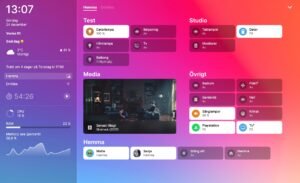
Home Assistant is a completely free and open-source software project. Think of it as a powerful operating system for your smart home. You install it on your own hardware, giving you complete control. Its massive global community means it has integrations for thousands of devices, commonly before they are officially supported anywhere else.
Pros:
- Unmatched Power: The customization for dashboards and automations is limitless.
- Massive Community: An integration for almost every device imaginable and a solution for every problem.
- Free Software: You only pay for the hardware you choose to run it on.
Cons:
- Steeper Learning Curve: While much easier than it used to be, you should be prepared to learn and tinker.
- DIY Hardware: You are responsible for buying and setting up the server hardware yourself.
Getting Started with Home Assistant
For maximum power, a Raspberry Pi 5 Starter Kit is the best way to begin. It includes everything you need to build a high-performance hub.
What is Hubitat Elevation?

Also,ion is a physical, all-in-one smart home hub. You buy the little black box, plug it in, and you’re ready to go. It comes with Zigbee and Z-Wave radios built-in. It’s designed to be a powerful local control system that is much more approachable and “appliance-like” than Home Assistant, backed by excellent official customer support.
Pros:
- Incredibly Easy Setup: You can be up and running in minutes. The user interface is straightforward and designed for simplicity.
- All-in-One Hardware: No need to source components. The Zigbee and Z-Wave radios are built-in.
- Excellent Official Support: A dedicated company and helpful community forum to assist you.
Cons:
- Less Customization: You operate within the “walls” of the Hubitat system. Dashboards and automations are less flexible than Home Assistant.
- Limited Amazon Availability: The latest C-8 Hub can be difficult to find on Amazon in all regions, commonly requiring a direct purchase.
Getting Started with Hubitat
The Hubitat Elevation is an all-in-one device. The best place to find the latest model is directly from their official website.
Frequently Asked Questions
Yes, significantly. Hubitat is designed as a consumer appliance with a much simpler setup process and user interface, making it ideal for beginners.
Frequently Asked Questions
Does Home Assistant require a subscription?
No. The Home Assistant software is 100% free. There is an optional cloud subscription ($5/month) called Nabu Casa for easy remote access, but it is not required for the system to function.
Can Hubitat work without internet?
Yes. This is one of its core strengths. Once set up, all your devices and automations run entirely locally on the hub and will continue to work perfectly even if your internet connection goes down.
Which hub is easier for beginners?
Also, simpler appliance-style hub. Home Assistant offers more power but needs more setup time and ongoing configuration.
Conclusion: The Tinkerer vs. The Doer
The choice between Home Assistant vs Hubitat comes down to a simple question: Do you want a smart home as a hobby, or as an appliance?
Choose Hubitat Elevation if: You want a powerful, private, local-control smart home without the fuss. You value a simple setup, an appliance-like experience, and official support. You want to set up your automations and have them just work, reliably.
Choose Home Assistant if: You want ultimate power and limitless customization. You enjoy tinkering with technology and building a system that is 100% unique to you. You want to be on the cutting edge and have integrations for every device under the sun.
For those who want the most capable smart home and don’t mind a steeper learning curve, Home Assistant is our top recommendation.
- Get Started: Our Complete Guide to Installing Home Assistant
- Get Connected: The Best Zigbee Sticks for 2025
What to check first
Confirm scope, price, and timing in writing before you pay a deposit or hand over keys or equipment.
Cross-check compatibility, safety and local rules with official sources before you buy. Australian 240 V wiring, RCM labelling and hub protocols change with firmware updates, so confirm details against manufacturer docs and a licensed electrician when mains power is involved.
Common mistakes to avoid
Skipping written quotes, ignoring reviews from the last 90 days, and assuming every suburb has the same availability.
Cross-check compatibility, safety and local rules with official sources before you buy. Australian 240 V wiring, RCM labelling and hub protocols change with firmware updates, so confirm details against manufacturer docs and a licensed electrician when mains power is involved.
How much does smart home gear cost over five years?
Sticker price is only part of the story. Hubs, repeaters, replacement batteries, cloud subscriptions and electrician call-outs can add up quickly on Australian 240 V installs. We compare total ownership cost in our reviews and link to primary references such as the Home Assistant documentation and the Matter specification when protocol compatibility matters. Budget for at least one spare sensor or switch when you standardise on a hub — mixed-vendor kits often need extra repeaters.
Cross-check compatibility, safety and local rules with official sources before you buy. Australian 240 V wiring, RCM labelling and hub protocols change with firmware updates, so confirm details against manufacturer docs and a licensed electrician when mains power is involved.
Which protocol should you standardise on?
Wi-Fi devices are easy to buy but noisy on your network. Zigbee and Thread/Matter devices usually need a compatible hub or border router, yet they tend to behave better when the internet drops. Before you bulk-buy sensors or switches, decide whether Modern Home Tech readers should prioritise local control, Apple Home, Google Home or Home Assistant — then pick products that match that path instead of mixing three ecosystems by accident. Thread border routers in Australia must still meet RCM requirements for radio equipment.
Which smart home news topics matter most for owners?
Protocol changes, security advisories and tariff updates affect real households more than launch-day hype. We prioritise Matter and Thread compatibility notes, recall notices, and energy price shifts that change whether automations still save money. Firmware regressions that break local control also rank above minor app redesigns — those are the updates worth reading before you buy more gear.
Cross-check compatibility, safety and local rules with official sources before you buy. Australian 240 V wiring, RCM labelling and hub protocols change with firmware updates, so confirm details against manufacturer docs and a licensed electrician when mains power is involved.


